
**What**: Concept of Algebra **Why**: What is an algebra why you need algebra **Time To Complete**: 1 hour
#### [](https://wiki.compclassnotes.com/uploads/images/gallery/2026-05/cc.png) #### Nature of Algebra Algebra is a set of finitely many symbols with functions and operators acting on these symbols in such a fashion that all these functions and operators can be implemented in an electromechanical device or a computer or computer program. A human being or a machine, by applying mechanically oriented operations could simply operate on the symbols of an algebra without any requirements to understand what the symbols or the operations are supposed to mean! The latter is called **Abstraction**. **Example**: The *Comma operator* a , b separates the ‘a’ from ‘b’ so it is not confused with ‘ab’ or in general separates the Right Hand Side (rhs) from Left Hand Side (lhs). **Example**: The *Function* Sin Sin(a) computes the well known trigonometric function Sinus. ##### Words A Word in an algebra is a sequence of concatenated symbols and functions and operators. **Example**: c = a + b symbols c, =, a, +, and b are concatenated or sequenced into a string of letters or a word as the final ensemble. ##### Valid Words Not all sequences of symbols in an algebra are Valid, indeed there is another ‘mechanical’ process of an algebra which qualifies a word either being Valid or Invalid. **Example**: a = b + 1 a valid word in algebra of arithmetic 1 +++, b an invalid word in algebra of arithmetic #### Repeatability The first motivation and the last goal of an algebra is one and only one namely **Repeatability**:If a set of symbols and operations manipulated by a person living in the 17th century was again manipulated by a person today, both efforts yield the same results!
This is due to the fact that Algebra at its core construction is like unto an electromechanical entity that requires no intelligence to operate! Even a machine can carry out the same operations!Students need to be aware that being good at algebra or making proficient use of algebraic systems does not require any intelligence, rather requires skills and in particular skills in programming. A person being good at algebra is decided by their skills to manipulate symbols and with no reference to his/her level of intelligence.
# Symbolic Computing**What**: Concept of Symbolic Computing **Why**: Computing with symbols and non-numerals **Time To Complete**: 1 hour
#### [](https://wiki.compclassnotes.com/uploads/images/gallery/2026-05/cc.png) #### Why? As discussed in previous class notes, the nature of algebra is conducive to expand our abilities to understand and compute geometries. Symbolic Computing, in part, is the very software engine that functions the said algebra’s symbols and expressions. Therefore, naturally Symbolic computing goes hand in glove with algebra. #### What? See simple example of use of Free Form language’s symbolic computing capabilities. Notice no numbers, all in symbols. ```diff var1 = a + b; var2 = a - b; res = var1 * var2; show res; res2 = expand[var1 * var2]; show res2; save as symbolics; ``` Output: ```diff { res = (a - b)*(a + b) , res2 = a^2 - b^2 } ``` # Vector Arithmetic # + and - operators**What**: Addition and Subtraction of Vectors **Why**: Detailed computations **Time To Complete**: 2 hours
#### [](https://wiki.compclassnotes.com/uploads/images/gallery/2026-05/cc.png) #### + ```diff //+ addition ; v1 = {a,2,c}+{1,b,3}; show v1; save as addition; ``` Output: ```diff "v1" → {1 + a, 2 + b, 3 + c} ``` '**//**' : **Comment Operator** instructing the Grammarian to ignore its sentence '**v1**' : identifier for a variable or **variable name** '**=**': **Assignment Operator** copying the Right Hand Side to Left Hand Side '**{ }**' : curly brackets, enclosing the list of elements in between '**a,2,c**' : **Elements** of the vector enclosed in '{ }' brackets '**;**' : **Delimiter** called semicolon indicating the end of a Free Form sentence, separating sentences '**show**': textually displays the followed variables '**save as**': instructs the Grammarian to save the Free Form script and all its interim computations in cloud objects #### - ```diff //- subtraction ; v1 = {a,2,c}-{1,b,3}; show v1; save as subtraction; ``` Output: ``` "v1" → {-1 + a, 2 - b, -3 + c} ``` #### Properties ##### 0-vector ```diff //+ 0 ; v1 = {a,b,c} + {0, 0, 0}; show v1; save as subtraction; ``` Output: ``` "v1" → {a, b, c} ``` ```diff //- 0 ; v1 = {a,b,c} - {0, 0, 0}; show v1; save as subtraction; ``` Output: ``` "v1" → {a, b, c} ``` **© 2012-Present CCN Studios** **Creative Commons Attribution-NonCommercial-ShareAlike 4.0** # *: Scale Factor**What**: Scale a vector **Why**: Computations to alter the length and direction of a vector **Time To Complete**: 1-3 hours
#### [](https://wiki.compclassnotes.com/uploads/images/gallery/2026-05/cc.png) Multiply a vector by a numeral from the **left**. ``` v = 5.4 * {x,y}; show v; save as scale; ``` Multiply a vector by a numeral from the **right**. ``` v = {x,y}*5.4; show v; save as scale; ``` Output ``` "v" → {5.4*x, 5.4*y} ``` **u** ought to be a variable/symbol or a numeral. **u** cannot be another vector. ``` v = u * {a, b, c, d, e, f}; show v; save as scale; ``` Output ``` "v" → {a*u, b*u, c*u, d*u, e*u, f*u} ``` # Scale Factor < 0**What**: Negative scale factor **Why**: How to reverse a vector to point in the opposite direction **Time To Complete**: 1-3 hours
#### [](https://wiki.compclassnotes.com/uploads/images/gallery/2026-05/cc.png) ``` v1 = {1,1}; v2 = -1*v1; //list of pivots; pivots = {{0,0}, {0,0}}; //list of vectors; vectors = {v1,v2}; vectorplot pivots vectors; save as scale; ``` Output [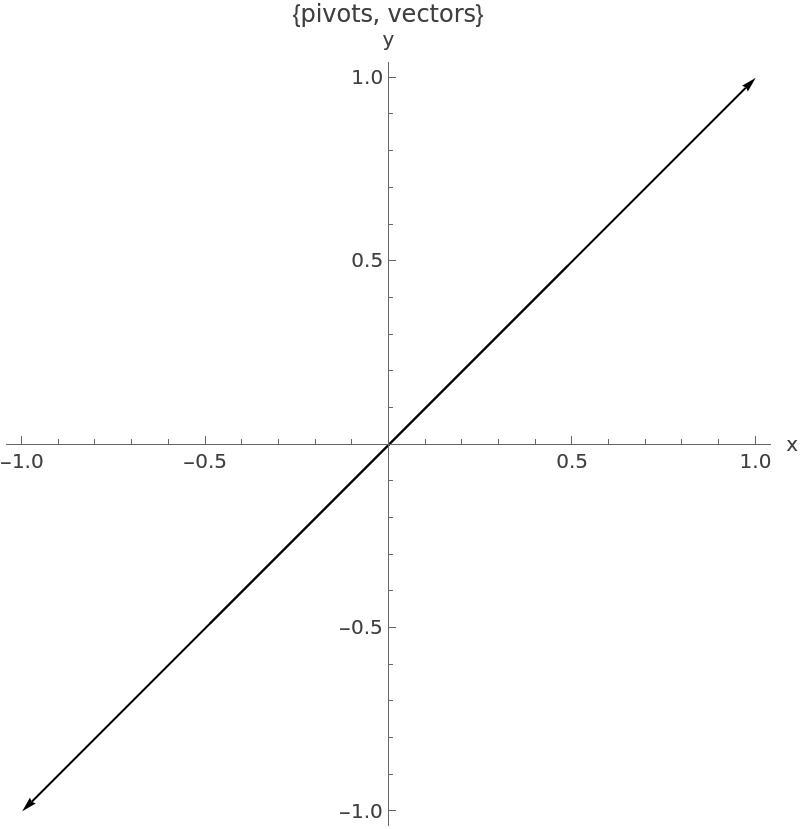](https://wiki.compclassnotes.com/uploads/images/gallery/2026-05/scaled-1680-/negative-scale.jpg) # Lines Definitions, constructions and utilities of lines. # Spray a Line!!!What: Sprinkle points along a 2D line and play Why: The equations and inequlities dealing with lines suddenly make better sense How: Get your eyes trained on reading math and code, by simply copy-paste one or few lines of the ff scripts below into new ff programs and use show or different plots to study the internal structures of the program. Time To Complete: 6 hours
**pts2** is your friend the Line! In 2D, any equation of the form a*x+b*y + c = 0 has solutions namely the x and y coordinates that satisfy the identity, namely lhs = rhs, line up along a fixed line specified by the three constants a, b and c.
Pay attention to the function-call color [{red, black,green}]; that sets a list of colors for three plots of points form pts1, pts2 and pts3. As you can see the black color corresponds to the second plot which is obtained from the pts2.
The single line of function-call below:
pts2 = instance[linear == 0 and -5
linear == 0 sets up an equation for 3*x+2*y-3 to be always 0.
50 is the number of requested randomly generated solutions to the Line Equation 3*x+2*y-3 = 0.
-5As you will learn in future we can alter that rectagular shape for much more intricate and exciting ones.
and indicates both inequalities -5