# Solvers

**Solving Equations by programming.**

**Author**<span>: Dara O Shayda </span>

**Artwork**<span>: The </span>[Electrofishers](https://blame.fandom.com/wiki/Electrofishers)<span> were originally </span>[Planters](https://blame.fandom.com/wiki/Planters "Planters")<span> who have splintered off and forgotten their past. They currently reside in an Abandoned Level after their original home was destroyed in a </span>[Safeguard](https://blame.fandom.com/wiki/Safeguard "Safeguard")<span> Attack.</span>

# Preface

<span style="white-space: pre-wrap;">This mostly </span>**live-code**<span style="white-space: pre-wrap;"> computational Wiki book addresses two audiences:</span>

1. <span style="white-space: pre-wrap;">STEM high school students to undergraduate college level students </span>
2. <span style="white-space: pre-wrap;">Programmers' and computer scientists' </span>**learning habitat**<span style="white-space: pre-wrap;"> to freely experiment with new concepts in programming languages</span>

<span style="white-space: pre-wrap;">On one hand the book is regimented for the absolute newbies with no programming experience, and on the other hand pushes the programmers off the cliff of commercial programming languages for better experiences. </span>

<span style="white-space: pre-wrap;">I am borrowing components from the formal language of the Alfred Tarski on modern mathematical logic. I did that to make my language more consistent with a concise paradigm + a terrific economy of the words, while staying away from the fluffy contemporary foo-foo dust publications. </span>

<span style="white-space: pre-wrap;">Dara O Shayda </span>

Chief of Software

<span style="white-space: pre-wrap;">Computational Classnotes </span>

Republic of Ireland, May 8th 2026

**foo-foo dust**<span style="white-space: pre-wrap;"> : A </span>[reference](https://www.urbandictionary.com/define.php?term=reference)<span style="white-space: pre-wrap;"> to a (</span>[non-existent](https://www.urbandictionary.com/define.php?term=non-existent)<span style="white-space: pre-wrap;">) power or </span>[mysterious](https://www.urbandictionary.com/define.php?term=mysterious)<span style="white-space: pre-wrap;"> ingredient or hidden effort that creates desirable results. Results achieved, as if by magic, perhaps by slight-of-hand.</span>

[https://www.urbandictionary.com/define.php?term=foo+foo+dust](https://www.urbandictionary.com/define.php?term=foo+foo+dust)<span style="white-space: pre-wrap;"></span>

# Background

Basics for setting up equations and extracting solutions.

# Terminologies

**lhs** : Left Hand Side

**rhs** : Right Hand Side

**p = q**<span style="white-space: pre-wrap;"> : an identity </span>

**Equational Expression**: expr1 = expr2 e.g. expr1 = a\*x+b and expr2 = cos\[b-c\]

**copy**<span style="white-space: pre-wrap;">: when an object is duplicated, byte by byte so to say, into a facsimile. </span>

<p class="callout warning"><span style="white-space: pre-wrap;">This definition of </span>**copy**<span style="white-space: pre-wrap;"> is the simplest to grasp the concept. In due places, more sophisticated definitions will be produced.</span></p>

**Structure**<span style="white-space: pre-wrap;">: a </span>**structure**<span style="white-space: pre-wrap;"> is that which permitting </span>**Similarity**<span style="white-space: pre-wrap;"> to other </span>**Similars**<span style="white-space: pre-wrap;">. </span>

**Example**<span style="white-space: pre-wrap;">: </span>**Circular**<span style="white-space: pre-wrap;"> is a structure since it permits </span>**similarity**<span style="white-space: pre-wrap;"> </span>**to**<span style="white-space: pre-wrap;"> anything that is </span>**round**<span style="white-space: pre-wrap;">. </span>

**Example**<span style="white-space: pre-wrap;">: </span>**Red**<span style="white-space: pre-wrap;"> is a structure since it permits </span>**similarity to**<span style="white-space: pre-wrap;"> anything that is </span>**red**<span style="white-space: pre-wrap;">. </span>

**Example**<span style="white-space: pre-wrap;">: </span>**Numeral**<span style="white-space: pre-wrap;"> is a structure since it permits </span>**similarity to**<span style="white-space: pre-wrap;"> anything that is a </span>**number**.

<span style="white-space: pre-wrap;">ff calls a list e.g. </span>**{1,2,3}** <span style="white-space: pre-wrap;">as a </span>**structure**<span style="white-space: pre-wrap;">, or a function e.g. </span>**cos\[ \]** <span style="white-space: pre-wrap;">a </span>**structure**<span style="white-space: pre-wrap;"> or an </span>**algebraic structure**<span style="white-space: pre-wrap;"> e.g. </span>**x^2-1**<span style="white-space: pre-wrap;">. </span>

# Symbols

<span style="color: rgb(0, 0, 0);">In Free Form Programming Language (ff) the concept of Symbol is more than one:</span>

1. <span style="color: rgb(0, 0, 0);">Individual alphabet in a language e.g. x in English , ω in Greek</span>
2. <span style="color: rgb(0, 0, 0);">Composite of individual symbols e.g. dara that while it is the concatenation of four alphabets ff treats it as a single symbol</span>
3. <span style="color: rgb(0, 0, 0); white-space: pre-wrap;">Mathematical symbols e.g. ⨂ </span>
4. <span style="color: rgb(0, 0, 0); white-space: pre-wrap;">Glyph (Unicode) e.g. 🌊 , 💬 </span>
5. <span style="color: rgb(0, 0, 0);">Glyph a raster image (this option is currently unavailable for HTML use)</span>

<p class="callout warning"><span style="color: rgb(0, 0, 0); white-space: pre-wrap;">The mathematical symbols in many cases have particular syntax and semantics in an expression which cannot be altered or ignored. </span></p>

<p class="callout warning"><span style="color: rgb(0, 0, 0);">The mathematical symbol single space or " " is interpreted multiplication in mathematical textbooks. Additionally in ff often " " is assigned the functionality of separator in a list of items.</span></p>

<span style="color: rgb(0, 0, 0);">o be more general ff defines a Symbol as follows:</span>

<p class="callout info"><span style="color: rgb(0, 0, 0);">An atomic or indivisible structure with no discerning programmable components is called a Symbol.</span></p>

# Constants

<span style="color: rgb(0, 0, 0); white-space: pre-wrap;">In Free Form Programming Language (ff) the concept of a </span>**Constant**<span style="color: rgb(0, 0, 0); white-space: pre-wrap;"> is an </span>**immutable**<span style="color: rgb(0, 0, 0); white-space: pre-wrap;"> structure. </span>

**Examples** <span style="color: rgb(0, 0, 0);">: 5, 𝝅 .</span>

# Operators

=

+

-

\*

/

<span style="white-space: pre-wrap;">{} </span>

<span style="white-space: pre-wrap;">() </span>

;

""

-&gt;

&lt;

&gt;

<span style="white-space: pre-wrap;">&lt;= </span>

<span style="white-space: pre-wrap;">⋂ </span>

⋃

⊕

✕

∂

<span style="white-space: pre-wrap;">∈ </span>

∉

<span style="white-space: pre-wrap;"> ⊂</span>

→

<span style="white-space: pre-wrap;">and </span>

# ==

value to rhs. What do we mean equal by value? Example: 3 = 6/2 in spite of the fact that lhs and rhs are made from very different expressions but their values are Identical or the same, hence the Identity term.

**=**<span style="white-space: pre-wrap;"> : copies stores the rhs into lhs;</span>

```
// = stores the rhs into lhs;
x1  = 5;

x2 = 2 * x1;

show x2;

// == creates an equations between lsh and rhs;
x3 = (x1 == 5);

show x3;


x4 = (x2 == 10);

show x4;

// lhs and rhs with different variables;
x5 = (x2 == 2*x1);

show x5;

save as equations;
```

# Expressions

**Algebraic**

<span style="color: rgb(0, 0, 0);">a\*(c-u)</span>

**Free Form**<span style="white-space: pre-wrap;"> </span>

<span style="color: rgb(0, 0, 0); white-space: pre-wrap;">solve a\*x +b == 0 for x </span>

# Words

"I am a word"

# Phrases

<span style="background-color: rgb(255, 255, 255);">The highlighted are the phrases</span>

<span style="white-space: pre-wrap;">pts = </span><span style="background-color: rgb(251, 238, 184);">evaluate l2</span><span style="white-space: pre-wrap;"> in the </span><span style="background-color: rgb(251, 238, 184);">-1 to 3</span><span style="white-space: pre-wrap;"> range </span><span style="background-color: rgb(251, 238, 184);">at increments of</span><span style="white-space: pre-wrap;"> (1/4); </span>

Part of a sentence, have a meaning in and of itself, but often has no procedural meaning alone.

# Sentences

<span style="color: rgb(0, 0, 0);">pts = evaluate l2 in the -1 to 3 range at increments of (1/4);</span>

<p class="callout danger">FIXME: line cannot be even be used as a subphrase;</p>

<span style="color: rgb(0, 0, 0);">l2 := l\[v,t,{0,b}\];</span>

# Sides of Equations

Applying same operations on both sides of =

# Manual Operations on the Sides

<p class="callout info"><span style="white-space: pre-wrap;">
<b>What</b>: Use ff to duplicate the manual ways handling equations as taught in school teachings.  
<b>Why</b>: To make sure you understand how to manipulate sides of an equation on your own. 
<b>How</b>: Simply try to duplicate what the teacher does to solve an equation by working the sides.
<b>Time To Complete</b>: 3 hours. </span></p>

<!--
comment
-->
<a href="https://creativecommons.org/licenses/by-nc-sa/4.0/legalcode.en" target="_blank">
<img src="https://wiki.compclassnotes.com/uploads/images/gallery/2026-05/scaled-1680-/cc.png" alt="Alt Text" width="20%" height="20%">

</a>

<span style="color: rgb(0, 0, 0);white-space: pre-wrap;">Manully set the lhs and rhs variables to some expressions of choice and then commence, step by step, applying the same arithmetic operations to both sides.</span>

<span style="color: rgb(0, 0, 0);white-space: pre-wrap;">In this example, the equation</span>

<span style="color: rgb(0, 0, 0);white-space: pre-wrap;">x-3 = 17*<b>y</b> +9 </span>

<span style="color: rgb(0, 0, 0);white-space: pre-wrap;">is being solved for <b>y</b> namely the equation is transformed to a new equation with <b>y</b> alone on either side as the solution.
</span>

```
lhs = x - 3;
rhs = 17 * y + 9;

lhs = lhs - 9;
rhs = rhs - 9;

lhs = lhs / 17;
rhs = rhs / 17;

show lhs also rhs;

save as sides;
```

**Output**

   <style>
        .box {
            width: 200px;
            height: 70px;
            background-color:  hsla(89, 43%, 51%, 0.3);
            border: 2px dotted orange;
            padding: 10px;
            margin: 10px;
        }
    </style>

<div class="box">
  "lhs" → (-12 + x)/17
  <br>
"rhs" → y
</div>

<hr style="border: 0; height: 1px; background-color: #ccc;">

<p style= "color: orange;font-size: 10px;"> <b>© 2012-Present CCN Studios</b> </p>

<p style= "color: orange;font-size: 10px">
<b>Creative Commons Attribution-NonCommercial-ShareAlike 4.0 </b>
</p>

# Right hand side vs. Left hand side

<p class="callout info"><span style="white-space: pre-wrap;"><b>What</b>: Different sides to an operator e.g. == 
<b>Why</b>: Proper treatment of the sides of an operator e.g. == results in much functionality
<b>Time To Complete</b>: 3 hours </span></p>

<!--
comment
-->
<a href="https://creativecommons.org/licenses/by-nc-sa/4.0/legalcode.en" target="_blank">
<img src="https://wiki.compclassnotes.com/uploads/images/gallery/2026-05/scaled-1680-/cc.png" alt="Alt Text" width="20%" height="20%">

</a>

#### <span style="background-color: rgb(251, 238, 184); white-space: pre-wrap;">.left </span><span style="white-space: pre-wrap;">and </span><span style="background-color: rgb(251, 238, 184);">.right</span>

<span style="color: rgb(0, 0, 0); white-space: pre-wrap;">In Free Form Programming Language (ff) the dot operator, namely the dot on your keyboard, allows for accessing **parts** of an expression!</span>

<span style="color: rgb(0, 0, 0);white-space: pre-wrap;">For a given equation e.g. eq, in the ff program below, the lhs or x^2-1+y can be accessed by the expression <span style="background-color: rgb(251, 238, 184);">eq.left</span> and a/b+c by the expression <span style="background-color: rgb(251, 238, 184);">eq.right. </span>

```
eq = (x^2-1+y == a/b+c);

lhs = eq.left;

show lhs;

rhs = eq.right;

show rhs;

save as sides;
```

**Output**

   <style>
        .box {
            width: 200px;
            height: 70px;
            background-color:  hsla(89, 43%, 51%, 0.3);
            border: 2px dotted orange;
            padding: 10px;
            margin: 10px;
        }
    </style>

<div class="box">
  "lhs" → -1 + x^2 + y 
  <br>
"rhs" → a/b + c
</div>

<hr style="border: 0; height: 1px; background-color: #ccc;">

<span style="color: rgb(0, 0, 0);white-space: pre-wrap;">The programmer is not required to use a symbol e.g. eq for this . access, as long as using the ( ) operator the results would be the same:</span>

```
tmp = (x^2-1+y == a/b+c).left;

show tmp;

save as lhsrhs;
```


**Output**

   <style>
        .box2 {
            width: 200px;
            height: 50px;
            background-color:  hsla(89, 43%, 51%, 0.3);
            border: 2px dotted orange;
            padding: 10px;
            margin: 10px;
        }
    </style>

<div class="box2">
  "tmp" → -1 + x^2 + y 
</div>

<hr style="border: 0; height: 1px; background-color: #ccc;">

#### ⊕

In Free Form Programming Language (ff), the Symbol ⊕ is one of several unassigned operators.

> <span style="color: rgb(0, 0, 0);">As you can see the . operator works perfectly even if the operator in use is not defined! This is a core language aspect of ff that allows undefined variables as well as undefined functions and undefined operators alike.</span>

```
eq = (x^2-1+y)  ⊕  (a/b+c);

lhs = eq.left;

show lhs;

rhs = eq.right;

show rhs;

save as sides;
```


**Output**

   <style>
        .box {
            width: 200px;
            height: 90px;
            background-color:  hsla(89, 43%, 51%, 0.3);
            border: 2px dotted orange;
            padding: 10px;
            margin: 10px;
        }
    </style>

<div class="box">
  "lhs" → -1 + x^2 + y 
  <br>
"rhs" → a/b + c
</div>

<hr style="border: 0; height: 1px; background-color: #ccc;">

Try different operators.

```
eq = (x^2-1+y)  <=  (a/b+c);

lhs = eq.left;

show lhs;

rhs = eq.right;

show rhs;

save as sides;
```

**Output**

   <style>
        .box {
            width: 200px;
            height: 70px;
            background-color:  hsla(89, 43%, 51%, 0.3);
            border: 2px dotted orange;
            padding: 10px;
            margin: 10px;
        }
    </style>

<div class="box">
  "lhs" → -1 + x^2 + y 
  <br>
"rhs" → a/b + c
</div>

<hr style="border: 0; height: 1px; background-color: #ccc;">

<p style= "color: orange;font-size: 10px;"> <b>© 2012-Present CCN Studios</b> </p>

<p style= "color: orange;font-size: 10px">
<b>Creative Commons Attribution-NonCommercial-ShareAlike 4.0 </b>
</p>

# Subtract from Sides

<p class="callout info"><span style="white-space: pre-wrap;"><b>What</b>: Subtract the same expression from the both sides of ==  
<b>Why</b><span style="white-space: pre-wrap;">: Such side-wise subtraction is an essential computation for solving equations </span>  
<b>Time to Complete</b><span style="white-space: pre-wrap;">: 3 hours </span></p>

```
eq = (x -3 == 17*y + 9);

lhs = eq.left - 9; 
rhs = eq.right - 9;

eq2 = (lhs == rhs);

show eq2;

save as sides;
```

Output

"eq2" → -12 + x == 17*y

**Output**

   <style>
        .box {
            width: 200px;
            height: 70px;
            background-color:  hsla(89, 43%, 51%, 0.3);
            border: 2px dotted orange;
            padding: 10px;
            margin: 10px;
        }
    </style>

<div class="box">
  "lhs" → (-12 + x)/17
  <br>
"rhs" → y
</div>


<hr style="border: 0; height: 1px; background-color: #ccc;">

<p style= "color: orange;font-size: 10px;"> <b>© 2012-Present CCN Studios</b> </p>

<p style= "color: orange;font-size: 10px">
<b>Creative Commons Attribution-NonCommercial-ShareAlike 4.0 </b>
</p>

# Add to Sides

<p class="callout info"><span style="white-space: pre-wrap;"><b>What</b>: Add the same expression to the both sides of == .
<b>Why</b><span style="white-space: pre-wrap;">: Such side-wise addition is an essential computation for solving equations. </span>  
<b>Time to Complete</b><span style="white-space: pre-wrap;">: 3 hours. </span></p>

```
eq = (x -3 == 17*y - 9);

lhs = eq.left + 9; 
rhs = eq.right + 9;

eq2 = (lhs == rhs);

show eq2;
```

**Output**

   <style>
        .box {
            width: 200px;
            height: 70px;
            background-color:  hsla(89, 43%, 51%, 0.3);
            border: 2px dotted orange;
            padding: 10px;
            margin: 10px;
        }
    </style>

<div class="box">
"eq2" → 6 + x == 17y

</div>


<hr style="border: 0; height: 1px; background-color: #ccc;">

<p style= "color: orange;font-size: 10px;"> <b>© 2012-Present CCN Studios</b> </p>

<p style= "color: orange;font-size: 10px">
<b>Creative Commons Attribution-NonCommercial-ShareAlike 4.0 </b>
</p>

# Divide both Sides

<p class="callout info"><span style="white-space: pre-wrap;"><b>What</b>: Divide both sides of == by the same expression.
<b>Why</b><span style="white-space: pre-wrap;">: Such side-wise division is an essential computation for solving equations. </span>  
<b>Time to Complete</b><span style="white-space: pre-wrap;">: 3 hours. </span></p>

```
eq = (x - 3 == 17*y);

lhs = eq.left / 17; 
rhs = eq.right /17;

eq2 = (lhs == rhs);

show eq2;

save as lhsrhs;
```

**Output**

   <style>
        .box {
            width: 200px;
            height: 70px;
            background-color:  hsla(89, 43%, 51%, 0.3);
            border: 2px dotted orange;
            padding: 10px;
            margin: 10px;
        }
    </style>

<div class="box">
"eq2" → (-3 + x)/17 == y

</div>


<hr style="border: 0; height: 1px; background-color: #ccc;">

<p style= "color: orange;font-size: 10px;"> <b>© 2012-Present CCN Studios</b> </p>

<p style= "color: orange;font-size: 10px">
<b>Creative Commons Attribution-NonCommercial-ShareAlike 4.0 </b>
</p>

# Multiply both Sides

<p class="callout info"><span style="white-space: pre-wrap;"><b>What</b>: Multiply both sides of == by the same expression.
<b>Why</b><span style="white-space: pre-wrap;">: Such side-wise multiplication is an essential computation for solving equations. </span>  
<b>Time to Complete</b><span style="white-space: pre-wrap;">: 4 hours. </span></p>
  
```
eq = (x - 3 == y / 13);

lhs = eq.left * 13; 
rhs = eq.right * 13;

eq2 = (lhs == rhs);

show eq2;
```

Output

"eq2" → 13*(-3 + x) == y


**Output**

   <style>
        .box {
            width: 200px;
            height: 70px;
            background-color:  hsla(89, 43%, 51%, 0.3);
            border: 2px dotted orange;
            padding: 10px;
            margin: 10px;
        }
    </style>

<div class="box">
"eq2" → 13*(-3 + x) == y

</div>


<hr style="border: 0; height: 1px; background-color: #ccc;">

##### Apply expand[ ] to one side
```
eq = (x - 3 == y / 13);

lhs = eq.left * 13; 
rhs = eq.right * 13;

eq2 = (lhs == rhs);

show eq2;

lhs = expand[eq2.left]; 
rhs = eq2.right;

eq3 = (lhs == rhs);

show eq3;

save as lhsrhs;
```

**Output**

   <style>
        .box {
            width: 200px;
            height: 70px;
            background-color:  hsla(89, 43%, 51%, 0.3);
            border: 2px dotted orange;
            padding: 10px;
            margin: 10px;
        }
    </style>

<div class="box">
"eq2" → 13*(-3 + x) == y
"eq3" → -39 + 13*x == y
</div>

<hr style="border: 0; height: 1px; background-color: #ccc;">

<p style= "color: orange;font-size: 10px;"> <b>© 2012-Present CCN Studios</b> </p>

<p style= "color: orange;font-size: 10px">
<b>Creative Commons Attribution-NonCommercial-ShareAlike 4.0 </b>
</p>

# solve[ ]

solve \[ \] function

# solve a*x + b = 0

```
sol =  solve[ a*x + b == 0, {x}];

show sol;

save as solve4;
```

Output

"sol" → {-(b/a)}

# solve a*x +b == 0 for x

```
sol =  solve a*x +b == 0 for x;

show sol;

save as solve4;
```

Output

"sol" → {-(b/a)}

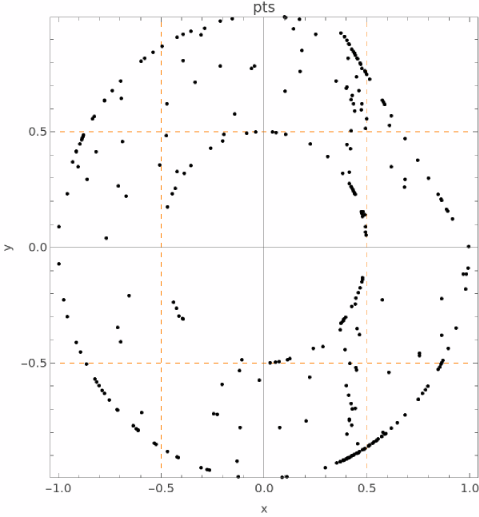
# instance [ ]

```
radius=norm[{x,y}];
linear = 3*x+2*y;

pts = instance [linear <= 3 and 0.5<=radius <=1 , 300];

//show pts;
pointplot pts;

save as cropped_anulus;
```

Ouput

[![instance_annulus.png](https://wiki.compclassnotes.com/uploads/images/gallery/2026-05/scaled-1680-/instance-annulus.png)](https://wiki.compclassnotes.com/uploads/images/gallery/2026-05/scaled-1680-/instance-annulus.png)